How does NetSuite handle complex manufacturing processes? We’re talking detailed assemblies, multiple teams and touchpoints, quality assurance, the works. What does managing all that look like in NetSuite? This is where the NetSuite Manufacturing Routing feature steps up. So let’s look at the many tools this feature puts in your hands, as well as how you can leverage those tools to streamline your manufacturing processes.

What Is Manufacturing Routing?

Manufacturing Routing is a NetSuite feature that lets you schedule and record operational activities against a work order that involves multiple employees or work centers. Rather than treating production as a single event, it breaks the process down into a defined sequence of steps, each assigned to the right team, resources, and cost structure.
Think about a product that moves through a preparation team, an assembly run team, and a quality assurance team before it’s finished. Routing gives you a way to define each of those steps, assign them to the appropriate work centers, track progress as work is completed, and capture the actual labor and machine costs along the way. It works only with assembly items using standard or average costing, and it requires work orders to be designated as Work In Process (WIP).

Setting Up Manufacturing Routing

Before you can start building routes, there are several setup steps to work through. Here’s the order:
First, enable the feature by going to Setup > Company > Enable Features and checking the box for Manufacturing Routing and Work Center under the Manufacturing tab.

    You will also need to enable the following five features:

    • Manufacturing Work In Process
    • Multi-Location Inventory
    • Work Orders
    • Assembly Items
    • Project Management
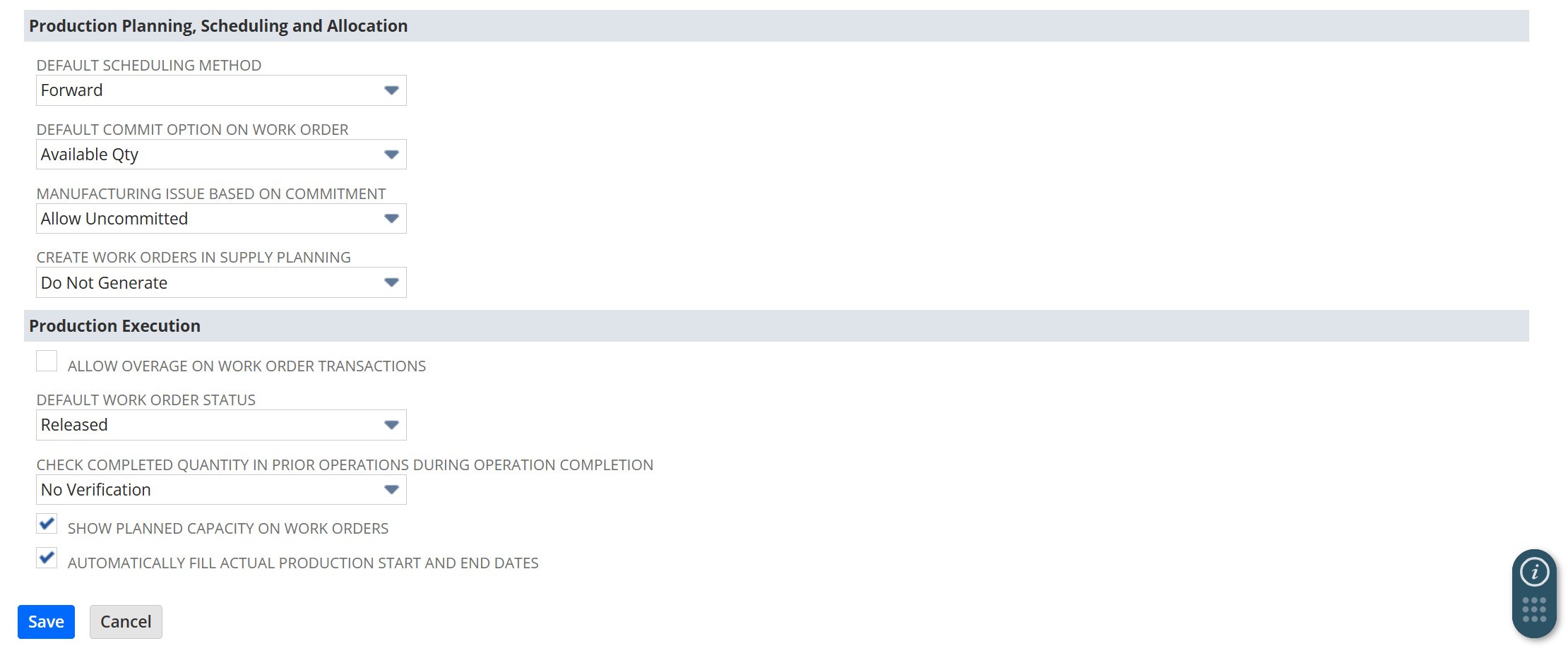
    From there, go to Setup > Manufacturing > Manufacturing Preferences to configure routing preferences, things like your default scheduling method and whether to show planned capacity on work orders.
    Set NetSuite Manufacturing Routing Preferences

    Next, you’ll need to define a few supporting records before creating your first routing:

    • Cost Categories categorize the types of costs associated with routing operations.
    • Manufacturing Charge Items are the service items used to record labor, machine, and overhead costs.
    • Manufacturing Cost Templates group charge items together so you can apply a consistent cost structure across operations.
    • Work Centers or Work Center Groups represent the teams or resources performing each step.

    Creating a Routing Record
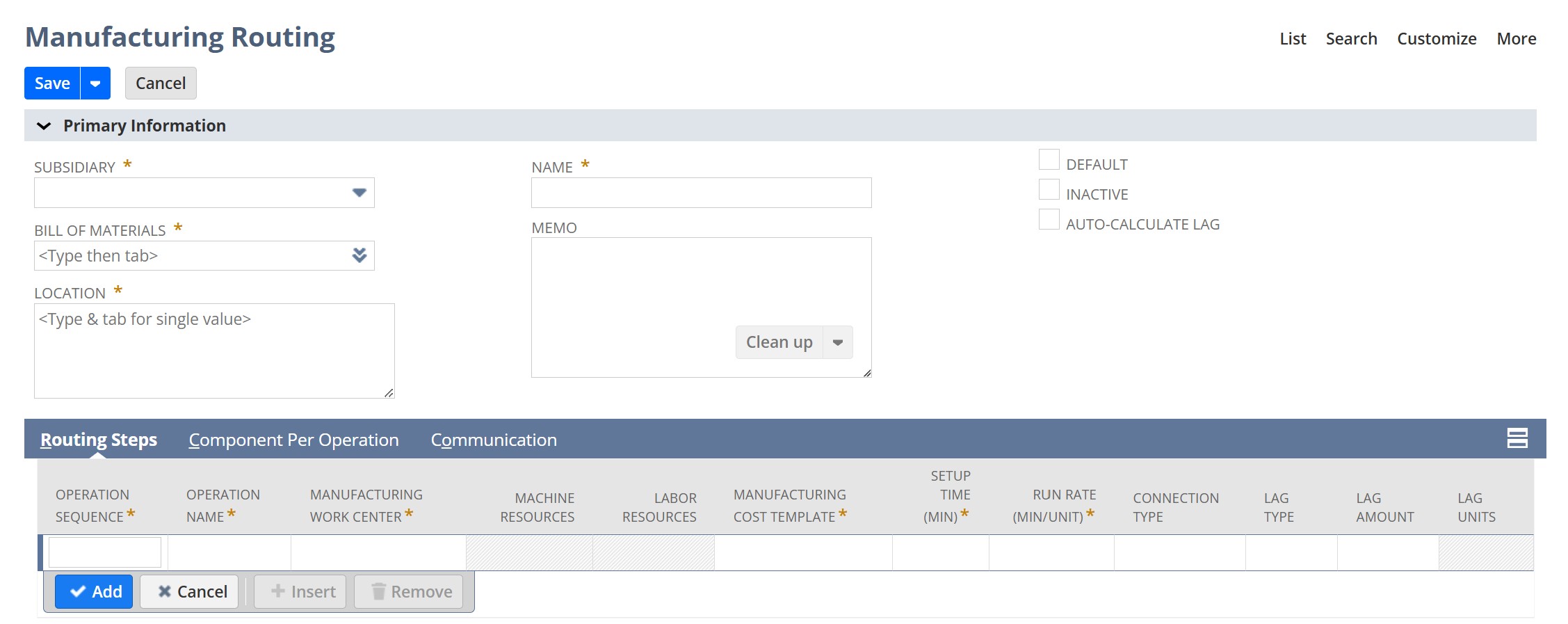
    Once your supporting records are in place, you can build the routing itself. Go to Lists > Supply Chain > Manufacturing Routing > New.
    Create NetSuite Manufacturing Routing record

    Start by selecting the assembly item the routing is for, then choose the location or locations where the assembly will take place. Give the routing a name, and check the Default box if you want it to automatically populate on new work orders for that item.

    From there, start entering your operations in sequence under the Routing Steps tab. For each step, you’ll enter an operation sequence number, an operation name, the work center assigned to that step, and the cost template to use. You’ll also enter setup time (fixed time to prepare for the step) and run rate (time per unit produced). These two values are what NetSuite uses to calculate the total time for each operation and to schedule the work order accordingly.

    You can also define how operations connect to each other using the Connection Type field, which controls whether one step needs to finish before the next one starts.

    Using Routing on Work Orders

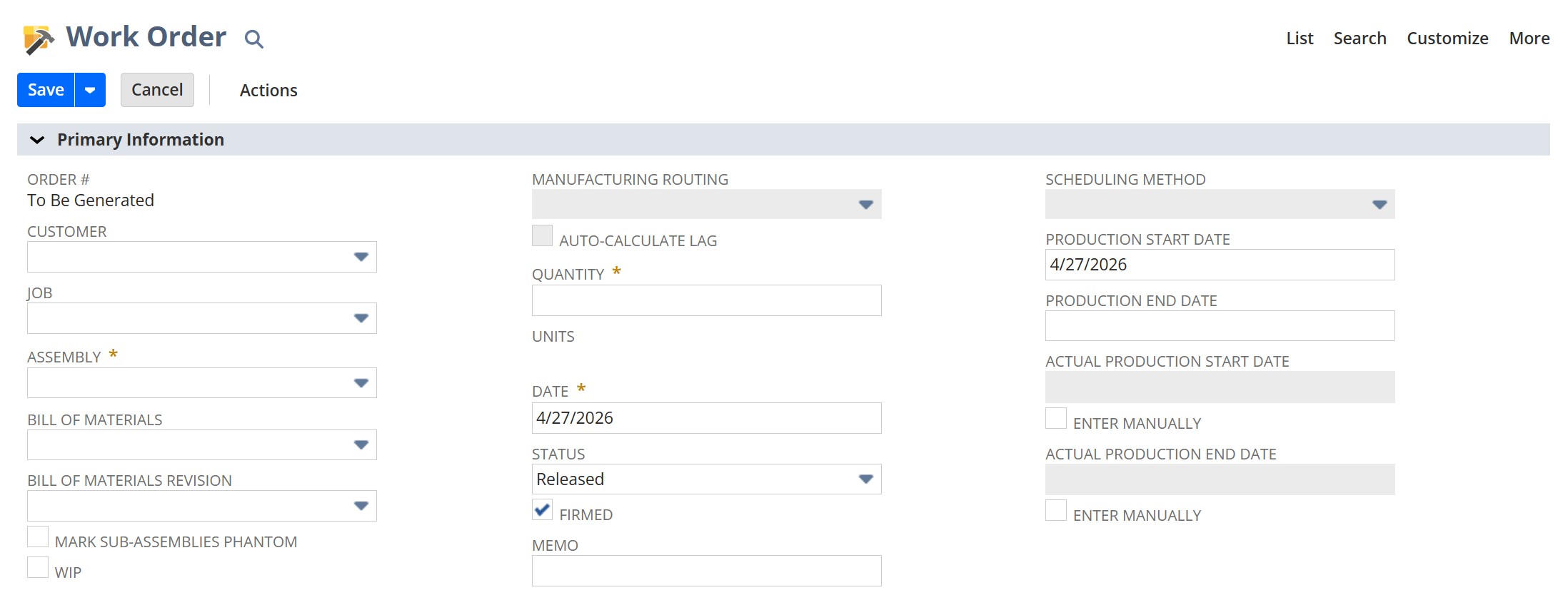
    When you create a work order for an assembly item that has a routing assigned, the process pulls everything together. Navigate to Transactions > Manufacturing > Enter Work Orders.
    Enter NetSuite Work Order

    After selecting the assembly item and location, check the WIP box and select the appropriate Manufacturing Routing. When you save, NetSuite generates operation tasks based on the routing steps you defined.

    The Operations subtab on a saved work order shows each task in sequence, with its assigned work center, scheduled times, and current status. As your team works through each step, operators log completions and time against individual tasks using the work order completion form. NetSuite tracks both the starting and ending operations for each completion entry, along with the quantity completed.

    As time is logged against operation tasks, the scheduling for all remaining tasks updates automatically, giving you a live view of where the order stands. Costs captured at each step, including labor and machine time, post to the WIP account during production. Once the assembly is finished and the work order is closed, those values move from the WIP account to the Asset for Assembly account.

    You can also add, edit, or delete operation tasks directly from the Operations subtab, as long as the task status is still set to Not Started.

    Forward and Backward Scheduling

    One of the more useful aspects of routing is how it handles production scheduling. NetSuite supports two methods.

    With forward scheduling, you set a production start date and NetSuite calculates the end date based on the time and resources required across all operations. With backward scheduling, you set the date you need the finished items, and NetSuite works backward to determine when production needs to start. This is especially useful when you’re planning against a customer delivery date and need to know how far out to begin.

    Both methods can be used on individual work orders and through supply planning when generating work orders in bulk.

    Putting It All Together

    Manufacturing Routing gives you the structure to manage complex production the way it actually runs: step by step, team by team, with real cost and schedule data at every stage. For manufacturers dealing with multi-step assemblies and multiple teams on the floor, it’s a significant upgrade over a single-step work order process.

    If you’re not sure whether routing is set up correctly in your NetSuite account, or if you’re just getting started with WIP manufacturing functionality, the team at SuiteRep is happy to help. Reach out and we’ll take a look at where you are and what might be holding you back.

    Get New Articles Directly in Your Inbox

    Are you new here? We typically post one blog a week, which we will deliver to your inbox when you subscribe to the SuiteRep newsletter.